Cannot Join Microsoft NT Domain - Device is joined to Azure AD
| Gen | General/Background |
| SOP | Standing Operating Procedure - Regain Ability to Join a Microsoft Domain. |
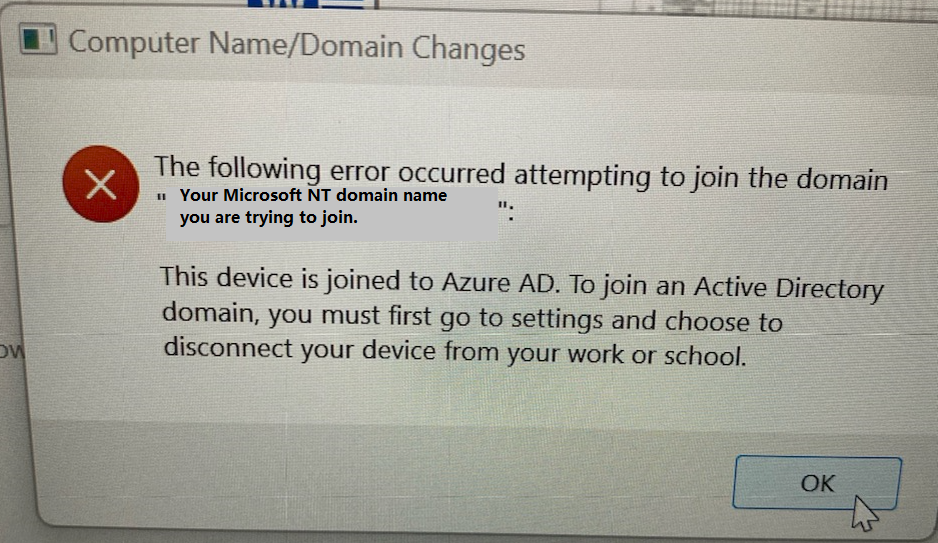
The if the reader has received the error message seen above with "This device is joined to Azure AD. To join an Active Directory domain, ...", this is the KB for you.
Do date (2024-03-28), this issue has only been expeerienced when trying to join a new computer to a Microsoft NT Domain AFTER having already connecting to Microsoft using a Microsoft ID (in creating the first user profile on said computer).
This siduation may be avoiced by NOT using a Microsoft ID during the initial setup of a new computer and, instead, using an "old school" local domain account. There are documented procedures for that which will be linked here in the future.
Microsoft IDs may still beused for licensing and other purposes, just not for setting up user profiles on computers. While not tried, nor recommended, it could be that a Microsoft ID based profile may be used AFTER joining an NT domain, but....
This document only addresses how to regain the ability to join a desired Microsoft ND Domain, once having come across the following error while unsuccessfully attempting to join said domain.
More information regarding Microsoft IDs in the OCS KBs are available.
Return to Knowledge Base (KB) home | Top
Note:
Return to Knowledge Base (KB) home | Top
Revised 2024-03-28 1845